How to Save Tokens Inside AI Agents Without Making Them Dumber
Token saving is not about starving your AI agent. It is about feeding it the right context at the right time. Here is the practical playbook.
ShopiKeys Editorial Team
Published May 7, 2026
Quick answer
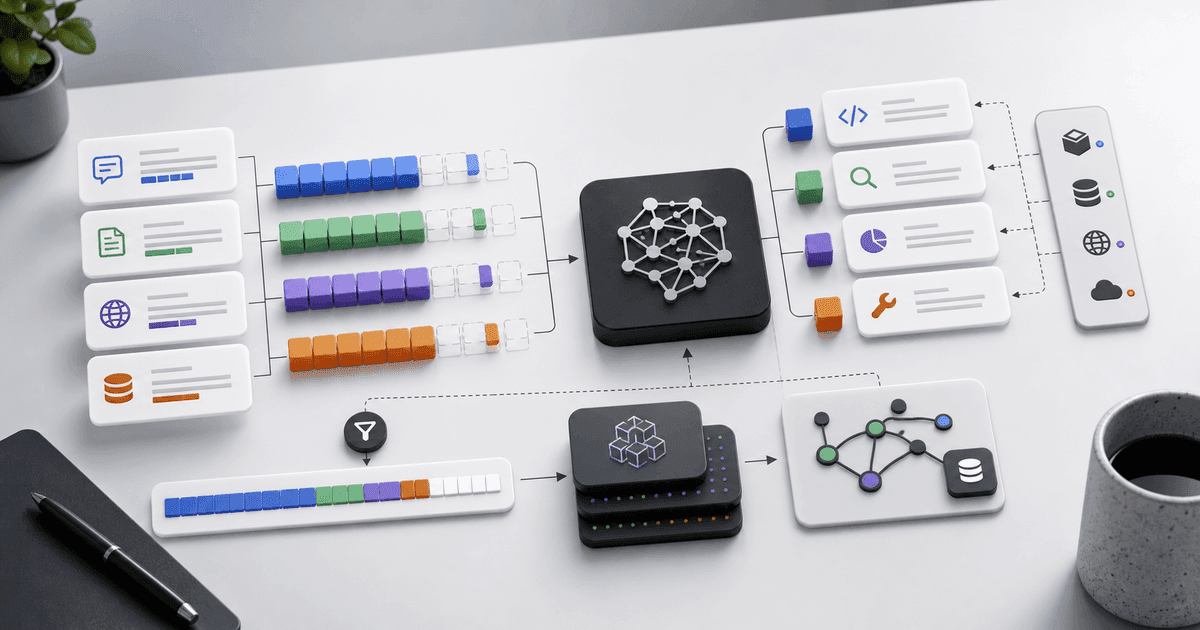
To save tokens inside AI agents, reduce irrelevant context before reducing useful context. Use context engineering, short system prompts, retrieval instead of dumping full documents, rolling summaries, structured outputs, prompt caching, smaller models for simple steps, tool schemas that are concise, and separate skills or instructions so the agent loads only what it needs. The goal is not to use the fewest tokens possible. The goal is to spend tokens only where they improve the result.
Tokens are the agent's working memory bill
Every AI agent has a hidden cost meter: the text it reads and the text it writes. Those pieces are tokens. Prompts, chat history, files, tool descriptions, function schemas, retrieved documents, logs, examples, and final answers all count.
When an agent feels expensive, the problem is rarely one giant prompt. It is usually a slow leak. A tool description that is too long. A conversation history that never gets summarized. A retrieval system that returns full documents instead of the right paragraphs. An agent that sends a 2,000-word explanation when a JSON object would do.
Saving tokens is not about making the agent blind. It is about making its attention sharper.
The wrong way to save tokens
The wrong way is to remove instructions that prevent mistakes.
For example, deleting security rules, output requirements, or domain constraints may reduce cost in the short term and create expensive errors later. If an agent writes unsafe code, chooses the wrong file, or invents missing facts, the cleanup costs more than the saved tokens.
Do not cut the brainstem. Cut the clutter.
Step 1: Create a context budget
A context budget defines what the agent should see for each task.
For a coding bug fix, the agent may need:
- issue description;
- relevant files;
- recent error logs;
- test command;
- coding rules;
- acceptance criteria.
It probably does not need:
- the entire repository;
- all old chat messages;
- every dependency file;
- full CI logs from unrelated jobs;
- every product requirement document ever written.
Write a simple rule:
For bug-fix tasks, include only the issue, relevant files, failing logs, test command, and coding standards. Summarize anything older than the current task.That one rule can save thousands of tokens per run.
Step 2: Replace long history with rolling summaries
Agents get worse when they carry every message forever. Use rolling summaries.
A good summary includes:
- current goal;
- decisions already made;
- files changed;
- open questions;
- constraints;
- next action.
Bad summary:
We talked about checkout and tests.Good summary:
Current task: fix duplicate coupon application on checkout refresh. Decision: do not change DB schema. Relevant files: checkoutController.ts, couponService.ts, checkout.test.ts. Failing behavior reproduced in test 'does not apply coupon twice'. Next step: adjust couponService idempotency check and rerun checkout tests.This keeps continuity without dragging the entire conversation into every step.
Step 3: Use retrieval instead of dumping documents
If your agent needs documents, do not paste the whole knowledge base into the prompt. Use retrieval.
The agent should search or fetch the most relevant chunks, then read those chunks. This is the core idea behind RAG, or retrieval-augmented generation.
Better retrieval rules:
- return small chunks;
- include titles and timestamps;
- prefer exact matches;
- rank official sources higher;
- retrieve again when the question changes;
- do not keep old retrieved context after it stops being relevant.
Retrieval saves tokens because it turns a library into a few paragraphs.
Step 4: Keep tool descriptions short
Tool schemas can quietly destroy a context window. Every tool name, description, parameter, and example may be loaded into the model's context.
If an agent has twenty tools and each tool has a long description, the agent spends tokens before it has even started the task.
Bad tool description:
This tool is used when the user wants to search for customer information in our extensive CRM database that contains contacts, companies, notes, emails, opportunities, lead scoring signals, and other business information...Better:
Search CRM records by name, email, company, or account ID. Returns matching contacts, companies, and opportunity summaries.Short descriptions improve both cost and tool choice.
Step 5: Split skills and instructions
Do not load every instruction for every task. If your agent supports skills, modules, or separate instruction files, split them by workflow.
For example:
- `seo-writing.md`
- `python-data-analysis.md`
- `legal-review.md`
- `react-refactor.md`
- `customer-support.md`
The agent should load the SEO skill for article briefs, not the React refactor skill. It should load the legal review checklist only when the task requires it.
This is context engineering: curating the right information during inference.
Step 6: Use structured outputs
Long natural-language answers are expensive. If the next step is automated, ask for structure.
Instead of:
Explain everything you found in detail.Use:
Return only this JSON: {"root_cause": "", "files_to_change": [], "test_command": "", "risk_level": "low|medium|high"}Structured outputs reduce tokens and make downstream automation easier.
Use prose when humans need nuance. Use structure when systems need data.
Step 7: Route simple tasks to smaller models
Not every step needs the strongest model.
Use a smaller or cheaper model for:
- classification;
- formatting;
- extracting dates;
- deduplicating items;
- rewriting short text;
- checking whether a message matches a known category.
Use a stronger model for:
- planning;
- complex coding;
- legal reasoning;
- strategy;
- ambiguous decisions;
- multi-step tool use.
Model routing saves money without lowering quality when the task is simple.
Step 8: Cache stable prompts
Many agent workflows repeat the same instructions: brand voice, policy rules, output schema, examples, and system messages. If your platform supports prompt caching, use it for stable content.
Good candidates for caching:
- system prompt;
- style guide;
- coding standards;
- fixed tool instructions;
- output format examples;
- safety policies.
Bad candidates:
- user-specific private data;
- rapidly changing context;
- temporary task details.
Caching works best when the repeated section stays exactly the same.
Step 9: Stop sending full logs
Logs are token traps. A 5,000-line error log usually contains one useful stack trace.
Before sending logs to an agent, trim them:
- include the first error;
- include the stack trace;
- include relevant environment details;
- remove repeated warnings;
- remove unrelated output;
- summarize long sections.
Prompt:
I will paste a shortened error log. Identify the likely root cause and ask for more log lines only if necessary.This prevents the agent from drowning in noise.
Step 10: Control verbosity
Agents often over-explain because users never tell them not to.
Add output limits:
Answer in under 200 words.Give me only the diff summary and test result.Do not explain basic concepts unless they affect the decision.Ask at most one clarifying question. Otherwise make a reasonable assumption and continue.A short answer is not always better, but uncontrolled verbosity is rarely useful.
What not to compress
Do not compress:
- safety constraints;
- exact user requirements;
- legal or compliance language;
- acceptance criteria;
- test failures;
- code snippets where exact syntax matters;
- numbers, dates, names, and IDs;
- source quotes that need precise wording.
Compress background. Preserve truth.
A token-saving checklist for AI agents
- Does this task need full chat history?
- Can old messages be summarized?
- Are we retrieving only relevant chunks?
- Are tool descriptions concise?
- Are unused tools hidden?
- Can the output be structured?
- Can a smaller model handle this step?
- Can stable instructions be cached?
- Are logs trimmed?
- Are repeated examples necessary?
- Is the agent loading only the skill it needs?
FAQ
What is a token in an AI model?
A token is a small unit of text that a model reads or writes. It can be a word, part of a word, punctuation, or another encoded unit depending on the model.
Why do AI agents use so many tokens?
Agents use tokens for prompts, memory, files, tool descriptions, retrieved documents, logs, intermediate reasoning summaries, and final outputs. Tool-heavy workflows can become expensive quickly.
Does reducing tokens make answers worse?
Only if you remove useful context. Good token optimization removes irrelevant context while preserving instructions, evidence, and task requirements.
What is context engineering?
Context engineering is the practice of selecting, organizing, and maintaining the right information in the model's context so it can perform well without wasting tokens.
Is RAG good for token savings?
Yes. RAG helps because the agent retrieves the most relevant chunks instead of reading an entire document collection.